Easy Guide to Install Jenny Mod Forge 1.12.2 on Windows & Mac
If Jenny Mod Forge 1.12.2 refuses to perform, chances are it isn’t a big deal that’s broken. Everything is compiled in Forge, which is a mod loader in between Minecraft and the mod files that’re needed for the game to be able to read them.
Jenny Mod was ONLY created for Jenny mod forge 1.12.2 : Java Edition, so your forge version must be 1.12.2. Not close exact. This is a tutorial that will take you from Java to dropping the mod file in the proper position on either Windows or Mac. Simply follow the steps one by one and it will be up and running.
What Is Jenny Mod for Minecraft?
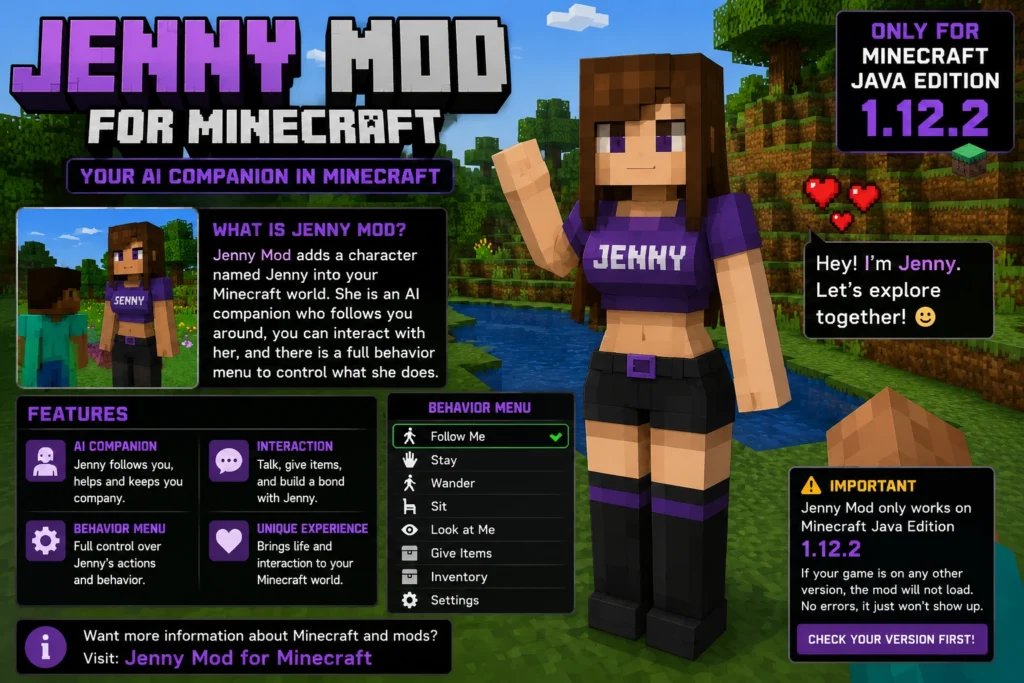
So basically Jenny Mod adds a character called Jenny into your Minecraft world. She is an AI companion she follows you around, you can interact with her, and there is a whole behavior menu where you can control what she does. The reason this mod got so popular is pretty simple vanilla Minecraft has nothing like this. No real character interaction, no companion system, nothing. Jenny fills that gap.
One thing you need to know before you go any further though this mod only runs on Minecraft Java Edition 1.12.2. If your game is on any other version, the mod will just not load. No error that makes sense, it just will not show up. So check your version first before doing anything else. If you need more information about Minecraft then you should visit Jenny Mod for Minecraft.
Why Use Jenny mod Forge 1.12.2 in Minecraft?
Minecraft by itself has no idea what to do with a .jar mod file. It just ignores it. Forge is what makes it work it sits in the middle and basically tells Minecraft how to read and run those mod files. Without Forge installed, Jenny Mod has nowhere to go.
Now the version matters a lot here. You need Jenny mod Forge 1.12.2.2860 that is the recommended build for 1.12.2 and the one that actually works with Jenny Mod. Do not grab a newer Forge build thinking it will be fine. 1.14, 1.16, whatever none of them will work. The game will either crash on startup or the mod just will not show up at all. The jenny Mod version 1.12.2 is the detail process of version compatibility issues and their downloads or solutions so you should check Jenny Mod version 1.12.2 .
System Requirements for jenny mod Forge 1.12.2:
Just run through this quick before you download anything:
| Requirement | Windows | Mac |
| OS Version | Windows 7, 8, 10, or 11 | macOS 10.14 or later |
| Java Version | Java 8 JDK (64-bit) | Java 8 JDK (64-bit) |
| Minecraft | Java Edition 1.12.2 | Java Edition 1.12.2 |
| RAM | Minimum 4GB | Minimum 4GB |
| Storage | At least 2GB free | At least 2GB free |
| Launcher | Official Mojang Launcher | Official Mojang Launcher |
What You Need to Download:
Get these four things ready before you start anything. Do not skip ahead having them all downloaded first makes the process much smoother:
Step 1: Download and Install Java:
Rewrite the code for the applet so it can run on Java 8 too. Not java 11, not java 17, java 8 in particular. Incorrect version will be installed and you will receive a “Class mismatch” exception and the game will not open.
To see what you have, on Windows press Win+R, type cmd, press Enter. Next, type java -version and then press Enter. On Mac, launch Terminal to do the same. If it shows 1.8.x you’re good. Otherwise, it must be patched.
Visit adoptium.net and download Java 8 JDK. Install it in the regular fashion, as with any program. When finished, close and reopen your command window and run java -version once again just to be sure it’s still displaying java 1.8.
Step 2: Download Jenny Mod Forge 1.12.2:
Click here to go to files.minecraftforge.net and select the Jenny mod forge 1.12.2 folder. Look for the build marked Recommended that is Forge 1.12.2.2860. Now click on Installer, watch the short ad while it’s up, and click skip when it is symbolized in the top corner.
The file which you download will be named something similar to Jenny mod forge 1.12.2-14.23.5.2860-installer.jar. Only use the official site – random links from the YouTube description or other sites typically have incomplete or broken builds, and you’ll spend time troubleshooting something that will never work.
⚒️ Step 3: Install Jenny mod Forge 1.12.2 on Windows
Before installing Forge, launch Minecraft 1.12.2 at least once and reach the title screen. This creates the required .minecraft folder so Forge can install correctly. If you skip this step, the Forge profile may not appear in your launcher.
Launch Jenny mod forge 1.12.2 First
Open the Minecraft Launcher, click Installations, create or select version 1.12.2, then press Play. Wait until the main menu appears before closing the game.
Run the Forge Installer
Locate the downloaded Jenny mod Forge 1.12.2 Installer (.jar), double-click it, choose Install Client, and click OK to begin the installation process.
Wait Until Installation Completes
Forge will automatically download the required files. Let the installer finish without interrupting it. Once the success message appears, the installation is complete.
Open Minecraft Launcher Again
Restart the launcher and check the profile list. You should now see a new Jenny mod Forge 1.12.2 profile. Select it and click Play.
Confirm Forge Is Working
After Minecraft opens, look for the Mods button on the main menu. If it appears, Forge has been installed successfully and is ready for installing Jenny Mod.
💡 Pro Tip
If the Forge profile does not appear, make sure Minecraft 1.12.2 was launched before installation and that you selected the correct Minecraft directory while installing Forge.
🍎 Step 4: Install Jenny mod Forge 1.12.2 on Mac
Installing Forge on macOS is almost the same as Windows. The only extra step is that macOS may block the Forge installer because it does not recognize the developer. Simply allow it and continue with the installation.
Launch Jenny mod forge 1.12.2
Open Minecraft Launcher, run version 1.12.2 once, wait until the main menu appears, then close the game.
Open the Forge Installer
Double-click the .jar installer. If macOS blocks it, go to System Preferences → Security & Privacy → General and click Open Anyway.
Install Forge
Select Install Client, click OK, and wait until the installation completes successfully.
Check Java Path
If Forge cannot detect Java, make sure Java 8 is installed correctly. Usually no manual configuration is needed.
Launch the Forge Profile
Open Minecraft Launcher, select the Forge profile, click Play, and confirm that the Mods button appears.
💡 Quick Tip
If the Forge installer still refuses to open, allow it from your Mac security settings and try again. Installing Java 8 also resolves most installation issues.
Step 5: Download Jenny Mod Forge 1.12.2 (Safe and Correct Version):
Look up Jenny Mod Forge 1.12.2 download and find the proper source. The file has to be a .jar not a .zip, not a .exe. If someone is giving you an .exe and calling it a Minecraft mod, just leave that page.
Save the .jar file somewhere easy like your Desktop or Downloads folder. Do not open it, do not rename it, do not extract it. It goes into the mods folder exactly as it downloaded. That is all.
Step 6: Install Jenny Mod Forge 1.12.2 on Windows:
Time to find the appdata folder and drop the mod file in the right spot:
1. Open the appdata folder: Press Win+R, type %appdata%, hit Enter. The Roaming folder opens.
2. Find the mods folder: Open .minecraft. You will see a mods folder inside. If it is not there, launch Minecraft with the Forge profile first and it will appear.
3. Drop in the mod file: Copy the Jenny Mod .jar and paste it straight into the mods folder. Not inside any subfolder directly in mods.
4. Done: Close the folder. Jenny Mod is installed on Windows.
Step 7: Install Jenny Mod Forge 1.12.2 on Mac:
The minecraft folder on Mac is hidden, so you need to dig a little to find it:
1. Open Finder
Firstly you can Click anywhere on the Desktop or open a Finder window.
2. Get to the Library
Click Go in the top menu bar, then hold the Option key. Library will pop up in the list click it.
3. Find the mods folder
Go to Application Support > minecraft > mods. No mods folder? Create one name it exactly mods, all lowercase.
4. Drop in the mod file
At the end Paste the Jenny Mod .jar directly into the mods folder.
Step 8: Launch Jenny mod Forge 1.12.2 Profile:
This is where a lot of people go wrong. They open the launcher, click Play without checking the profile, and then spend an hour wondering why nothing changed.
1. Open the Minecraft launcher: Check the bottom-left corner of the launcher window.
2. Select the Forge profile: Make sure it says Jenny mod Forge 1.12.2. Not Latest Release, not any other version.
3. Hit Play: The game takes a bit longer to load than usual that is just Forge reading through the mods folder.
4. Check the Mods button: On the main menu, click Mods and look for Jenny Mod in the list. If it is there, everything worked.
5. Load a world: Jump into a new world or an existing one. Jenny should be in there.
How to Verify Jenny Mod Forge 1.12.2 Is Working Correctly:
After the game opens, hit the Mods button on the main menu. Scroll through and look for Jenny Mod. If it shows up there, the mod loaded fine. If it is missing, either the .jar is in the wrong place or you launched with the wrong profile those are the two most common reasons.
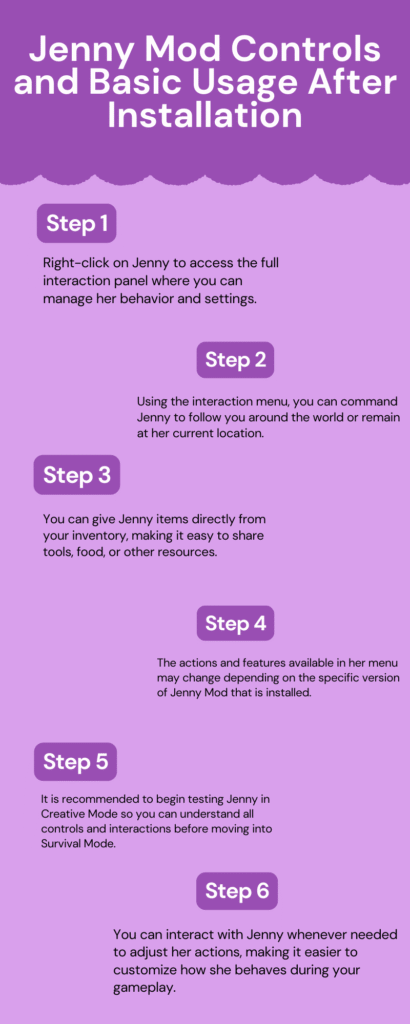
In-game, the easiest way to test is a new Creative Mode world. Explore a bit and see if Jenny appears as a character you can walk up to and interact with. Right-click on her and the interaction menu will open. If that works, you are all set.
Common errors and fixes:
🛠 Common Forge & Jenny Mod Forge 1.12.2 Errors
If Jenny Mod or Forge refuses to work, don’t panic. Most installation issues are caused by a few common mistakes. Below are the most frequent problems along with the exact reason and the quickest way to fix them.
Forge Not Showing in Launcher
Launcher Issue❓ Why It Happens
The Forge installer was launched before Jenny mod forge 1.12.2 had ever been opened. Because of this, the required .minecraft folders were never created, so Forge couldn’t register its profile.
✅ Quick Fix
Open Minecraft Launcher, run version 1.12.2 once, reach the title screen, close the game, and then install Forge again. The Forge profile should now appear normally.
Jenny Mod Not Loading
Installation Issue❓ Why It Happens
The Jenny Mod file was placed inside the wrong folder, or Minecraft was started using the normal profile instead of the Forge profile.
✅ Quick Fix
Move the Jenny Mod .jar directly into the mods folder (not inside another folder) and always launch Minecraft using the Jenny mod Forge 1.12.2 profile.
Game Crashes on Startup
Mod Conflict❓ Why It Happens
Another installed mod is conflicting with Jenny Mod, or your Forge version does not match Minecraft 1.12.2.
✅ Quick Fix
Remove every other mod from the mods folder except Jenny Mod. Test the game, then add the remaining mods back one at a time until the conflicting mod is identified.
Class Mismatch Error
Java Version Issue❓ Why It Happens
Jenny mod Forge 1.12.2 only works properly with Java 8. If your computer is using Java 11, Java 17, or any newer version, Forge may display a class mismatch error or fail to start completely.
✅ Quick Fix
Uninstall all existing Java versions, install the Java 8 JDK (64-bit), restart your computer, and run java -version to confirm it shows version 1.8.
Mods Folder Missing
Folder Issue❓ Why It Happens
Forge was installed successfully, but you never launched Minecraft using the Forge profile. Because of this, the mods folder was never created automatically.
✅ Quick Fix
Launch Minecraft once with the Forge profile. If the folder still doesn’t appear, open the .minecraft directory and manually create a folder named mods using lowercase letters.
Forge Installer Blocked on Mac
macOS Security❓ Why It Happens
macOS blocks applications downloaded from outside the App Store if they are not verified by Apple. This prevents the Forge installer from opening normally.
✅ Quick Fix
Open System Preferences → Security & Privacy → General, locate the Forge warning message, click Open Anyway, enter your administrator password, and reopen the installer.
🚀 Still Having Problems?
If you’ve followed every step and Jenny Mod still isn’t working, double-check that you’re using the correct combination of Jenny mod forge 1.12.2, Forge 14.23.5.2860, and Java 8 (64-bit). Most installation problems are caused by using the wrong Forge build, an unsupported Java version, or placing the mod file in the wrong directory.
Jenny Mod Forge 1.12.2 Controls and Basic Usage After Installation:
Once Jenny is in your world, here is how to actually use her:
Pros and Cons of Installing Jenny Mod Forge 1.12.2:
| Pros | Cons |
| Setup is straightforward once you know the right order of steps. | Only works on Jenny mod forge 1.12.2 there is no updated version for anything newer |
| Forge 1.12.2 is one of the most stable mod loader builds out there it has been tested for years. | Completely useless on Bedrock, MCPE, Xbox, PlayStation, or any non-Java platform |
| Jenny adds real character interaction to Minecraft which the base game completely lacks. | Finding a clean download source is annoying because sketchy sites love to host fake versions |
| You can run other 1.12.2 mods alongside Jenny if you want to build out a bigger modpack. | Mac users can hit Java and permission issues that need a few extra steps to sort out |
| Works on both Windows and Mac no major differences between the two platforms | One wrong Forge version and the whole setup breaks you have to start over |
| You do not need any coding knowledge, just basic file management | Load times go up noticeably when Forge mods are involved |
| The Forge profile keeps your modded game separate so your vanilla worlds stay untouched | No official support you are on your own if something goes sideways |
| Huge community around this mod means answers are easy to find if you hit a problem | The mod is not being updated anymore so any bugs that exist are staying |
| Jenny has a full interaction menu that gives you real control over what she does | Some antivirus tools flag the Forge installer and you have to whitelist it manually |
| Once it is set up properly, the mod runs smoothly without killing your frame rate | Mod conflicts are a pain to diagnose if you are running a bunch of mods at once |
Tips to Improve Performance with Forge Mods:
❓ Frequently Asked Questions
Find quick answers to the most common questions about installing Forge 1.12.2 and using Jenny Mod.
Which Forge version works with Jenny Mod?
Jenny Mod works best with Forge 1.12.2 build 14.23.5.2860. Using any other Forge version may cause crashes or prevent the mod from loading correctly.
How do I open the Forge installer on Mac?
If macOS blocks the installer, open System Preferences → Security & Privacy → General, locate the Forge warning message, and click Open Anyway. After that, the installer should open normally.
Forge says outdated Java. How do I fix it?
Remove the current Java version, install Java 8 (64-bit), restart your computer, and run java -version to confirm it shows version 1.8.
Do I need Java to install Jenny Mod?
Yes. Forge requires Java 8 to run. Without Java installed, the Forge installer cannot open or load any Minecraft mods.
Where exactly is the mods folder?
Windows: Press Win + R, type %appdata%, open the .minecraft folder, then open mods.
Mac: Open Finder → Go → Hold Option → Library → Application Support → minecraft → mods.
Does Jenny Mod work with other mods?
Yes. Most Minecraft 1.12.2 mods work alongside Jenny Mod. However, mods that modify core game files may conflict and cause crashes or unexpected behavior.
Conclusion of Jenny Mod Forge 1.12.2:
Believe me…the installation is not too difficult. People tend to have problems because of three reasons: they didn’t launch the game before installing Forge, they don’t use the correct version of Forge, and they are running Minecraft with the wrong profile (default vs Forge). Sort those three out and it’s just a matter of putting a file into the proper folder.
If it continues to be non-working, refer back to errors table and identify the problem. Most of the time, class mismatch occurs due to a mismatch in the version of Java. If Mod doesn’t appear in the menu, its most likely the wrong launcher profile. Both can be solved with simple solutions.
Then after it’s up and running, take a few minutes to traverse the menu of interaction and to get to know the controls. If you’re just trying to play through the mod, you might want to do it in Creative Mode, since that allows you to take out some of the survival elements from the game.