
How to Install Jenny Mod easily and best on PC, Java, Android & MCPE 2026 :
(PC, Java, MCPE & Mobile)
After reading this, you will be surprised by knowing the craze of jenny mod, installation guide will help you understand the installation process in the simplest possible way. Just read carefully, step by step, and you will have everything set up smoothly in no time, without any stress.
How to install Jeny Mod can seem confusing at first , especially for new players. This guide is designed to simplify the entire process with clear instructions and easy steps. No matter your experience level, you will be able to set up everything correctly and start using the mod without unnecessary complications. This installation guide is for beginners as well as advanced players.
Content table info
Quick and easy way how to install jenny mod( MCPE, bedrock- edition mobile

Jenny mod works on android devices running PE 1.17 and higher, here ios work but has limits support.
Essential requirments before installation:
Installation Jenny MOd steps for andriod
Quick Information
Mod: Jenny Mod
Game: Minecraft PE
Platform: Android
File Type: MCAddon
Download Files
Behavior Pack
Download Behavior PackResource Pack
Download Resource PackInstallation Time
Approx. 2–5 minutes
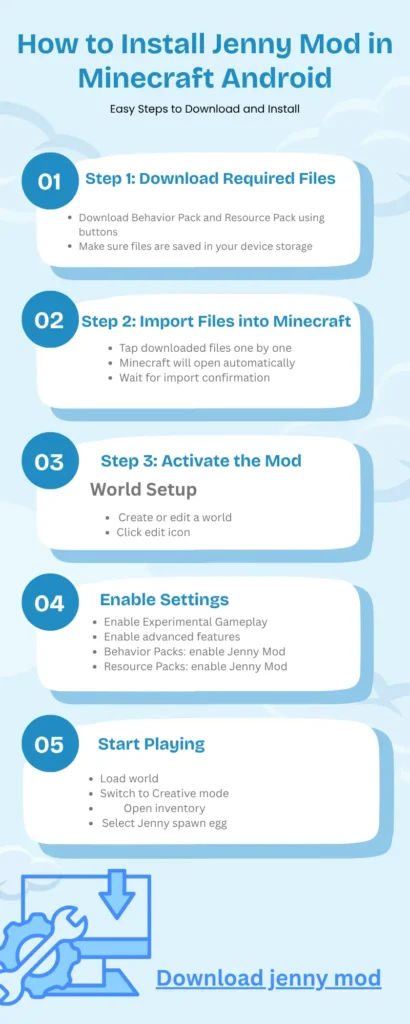
How to Install Jenny Mod in Minecraft Android
This guide explains how to install Jenny Mod in Minecraft Pocket Edition on Android devices. Follow these steps carefully to ensure proper installation and full functionality.
Step 1: Download Required Files
- Download Behavior Pack and Resource Pack using buttons
- Make sure files are saved in your device storage
Step 2: Import Files into Minecraft
- Tap downloaded files one by one
- Minecraft will open automatically
- Wait for import confirmation
Step 3: Activate the Mod
World Setup
- Create or edit a world
- Click edit icon
Enable Settings
- Enable Experimental Gameplay
- Enable advanced features
Activate Packs
- Behavior Packs: enable Jenny Mod
- Resource Packs: enable Jenny Mod
Step 4: Start Playing
- Load world
- Switch to Creative mode
- Open inventory
- Select Jenny spawn egg
Manual Installation Method
- Rename file to ZIP
- Extract and move files manually
Important Settings
- Experimental Gameplay must be enabled
- Behavior Pack active
- Resource Pack active
Troubleshooting
- Not importing: check file format
- Not showing: enable packs
- Crash: remove other mods
Fast Installation
Setup in less than 5 minutes
Fully Tested
Works on latest Minecraft versions
No Errors
Optimized steps to avoid issues
Download
Import
Activate
Play
Requirements need:
- Minecraft PE and bedrock edition (v1.17 or later).
- use a file manager like zArchiver or other
- the jenny mod MCaddon file also downloaded

Avoid Random YouTube Downloads
Many videos provide fake or modified files that may harm your device or game.
Beware of Malware Files
Untrusted APK or mod files can contain hidden malware or harmful scripts.
Use Trusted Sources Only
Always download Jenny Mod from reliable and verified links.
Check File Format
Make sure files are in .mcaddon or .mcpack format before installing.
How to install jenny mod (java edition -PC):
Best way how to install Jenny Mod(Java Edition-PC):
How to install Jenny Mod works properly only if it is compatible with version 1.12.2 or higher of the PC version of Minecraft Java edition. You can easily and correctly install it on your PC using these instructions. Before continuing, ensure that the correct versions of Minecraft Forge and Minecraft are installed. This allows the mod to operate correctly without crashing the game.
How to install jenny Mod easy steps for PC Java Edition:
Install Minecraft Forge 1.12.2
- Download Forge installer from official website
- Run installer and select “Install Client”
- Launch Minecraft using Forge profile
Download Jenny Mod JAR File
- Download mod file from a secure source
- Save it in an easy-to-find location
Move File to Minecraft Mods Folder
- Open Minecraft directory
- Go to mods folder
- Place Jenny Mod .jar file inside
Launch Minecraft with Forge
- Open Minecraft Launcher
- Select Forge profile
- Click Play and load world
Activate and Use Jenny Mod
- Enter the game world
- Use creative mode spawn eggs or commands
- Verify mod features are working
Conclusion:
Jenny mod minecraft has fun, easy to understand and add-on for minecraft that can work both for PC and mobile that can enhances the gameplay experience with interactive NCP jenny. This mod is easy way how to install jenny mod or its download with various version making it more useful in both for creative and survival players.
In addition to this the mod gives player more creative freedom and a different style of gameplay that is not available in the original minecraft version. With proper installation and correct setting, players can explore new interactions and features without facing technical issues.
In short, the Jenny mod is a good choice for players who are exciting in Minecraft and want to try new. Just ensure that to follow each step properly and enjoy a smooth gameplay and experience.
This guide is created after testing Jenny Mod installation on multiple devices including PC, Java Edition, and Android (MCPE). All steps are verified to ensure safe and error-free setup.
Guide Verified by Mod Installation Expert
Minecraft Mods & Setup Specialist
Updated for 2026 compatibility